Blog
Latest posts from Medium
My Idea Finder Had Exactly One Idea: Make It Cheaper
What the script actually did My AI Agent Product Ownership Story: Your agent can’t define “good” for you. You still own the product.A few weeks ago, I developed an internal tool for myself, a niche idea finder program. In my head, it was simple: Fetch the latest comments from the app stores, pull search engine results, cross-reference Google Trends, and surface the real pain points people are complaining about. Find the signal. Build the product.I ran it and waited for the magic.The top insight my idea finder returned, after rounds of “analysis,” was this: people want subscription prices to be lower, and someone should build a product that helps with that.That was it. That was the signal 😅The script did exactly what I told it to do. It scraped comments. It clustered complaints. It matched them against search volume. It correlated trends. Every step worked. Every box was ticked. There were even some unit tests that all passed, full green.The problem was upstream of the code. I had never defined what a “good idea signal” looked like to me. I mean, I did give some examples and some ideas on how it should be. Not in a way you could write a function against. I just had a vague feeling that I’d recognize one when I saw it. But it was not precise, not like I am paying tens of thousands of dollars to get this product from a 3rd-party company. If it were the case, I wouldn't have let them hallucinate on my money and half-baked ideas.So when the agent wrote the correlation logic, it optimized for what was measurable, not what was meaningful. What does meaningful even mean here? Dude… I need a philosophy degree to be a good product owner.The loudest complaints across the largest cluster of people. That’s “price is too high,” every time, in every category. Of course it is. That’s gravity.The agent wasn’t wrong in the end.When I started coding with Claude Code for days, then weeks, then months, my working model was this: treat the agent like a third-party company I’m hiring to build things for me. Write a brief, hand it off, review the output, iterate.That model held up for small tasks. It fell apart on anything that required taste, domain expertise, and hard work on the product side.As an experienced developer, I already know how third-party engagements go wrong. The requirements looked clear. The vendor delivered something that technically matches. You open it and it’s not what you wanted, and the gap between “what you said” and “what you meant” is where the whole project lived.Agents have the same failure mode, except faster and cheaper, so you stop noticing it.You blow through 40 iterations in a day, each one slightly off, and you never stop to ask the uncomfortable question: Do I actually know what I want here? Could I describe the target output to a human, concretely, before any code is written?For my idea finder, the answer was no. I was outsourcing a decision I hadn’t made.There’s a category of questions your agent physically cannot answer for you. Not because it’s not smart enough. Because the answer lives in your head and nowhere else.For the idea finder, the questions I hadn’t answered were things like:What counts as a “good” signal? A complaint with high volume? High emotional intensity? Low competition? A complaint that implies a workflow people are already paying to solve badly?Why am I even scraping store reviews in the first place? Are indie app reviewers representative of the market I want to build for? Or am I just fishing where the water is shallow?What does a valid output look like? Can I write down three real examples of “good signals” from products I admire, so the agent has something to match against?What am I going to reject? Price complaints. Generic UX gripes. “Make it free.” If I can’t list what to filter out, my signal is going to drown in noise.None of these are coding questions. They’re product questions. And I had handed them all to the agent by accident, just by not writing them down.When the script returned “people want cheaper subscriptions,” it wasn’t a bug. It was the honest answer to a brief I hadn’t written.The fix was embarrassingly simple, yet requires diligence and proper hard work instead of only "talking to an agent". It’s the lesson I keep learning over and over.Before the agent writes a single line, I now force myself to produce target output examples, run a complete manual round myself if possible. Not acceptance criteria in the abstract. Actual, concrete examples of what “success” looks like if this thing ran perfectly.For the idea finder, that meant sitting down and writing three fake “ideal” outputs by hand. “Users of budgeting apps in the EU keep asking for shared household budgets with separate personal envelopes, and three of the top four apps either don’t support it or charge for it as a premium tier.” That kind of thing. Specific. Opinionated. Impossible to mistake for “lower the prices.”Once I had three examples I actually wanted to see, the whole script changed. The filters changed. The correlation logic changed. Half the data sources I was scraping went in the trash because they couldn’t produce the shape of output I was now asking for. Maybe app store comments were the wrong place to look at all. Maybe I needed forum threads, support tickets, Reddit niche subreddits. The target output was telling me where to fish.That reshaping was never going to come from the agent. It came from me writing down what “good” meant, in examples, before pretending the agent could find it.Here’s the shift that’s been building in me for months, and the idea finder just made it loud.When I delegate execution to agents, I don’t get to delegate the product. I still have to own it. Owning it doesn’t mean writing the code. It means owning the definitions the code depends on.What “good” means for this output. What “correlated” means for this data. What “done” means for this PRD. What “a signal worth chasing” means versus “noise that happens to be loud.” What I’m willing to reject, even when the agent produces it confidently.The more I let the agent handle the typing, the more I have to work on my own methods of thinking about the product. Summaries I can actually skim. Diagrams I can actually read. Documentation I can come back to in a week and recognize. Target output examples for every non-trivial task. A running sense of the state of the product that doesn’t live only in transcripts.I used to draw a lot of diagrams by hand when I was the one writing every line. I thought I drew them for documentation. Nope! I drew them to understand what I was building. Now that the agent is doing the building, I need those diagrams more, not less, because they’re the only thing that keeps me in the driver’s seat.Before I hand anything non-trivial to an agent, I try to answer one question honestly: could I describe the target output to a smart human collaborator, with examples, and have them push back where I’m being vague?If I can’t, the task isn’t ready for an agent. It’s not even ready for me yet. What it’s ready for is ten minutes of me sitting with a notebook, writing down what “good” looks like for this specific thing, on this specific day, for this specific product.Ten minutes of that will save me from building another idea finder that confidently tells me to make things cheaper.Agents are fast, patient, and relentlessly literal. They execute whatever definition of “good” you encode into their inputs, even if that definition is “the loudest thing in the dataset.” They can’t nudge you when your framing is off. They can’t know what’s in your head. They can’t own your product.You can. And if you don’t, nobody will, because the agent is busy shipping the wrong thing correctly.Own the definitions. Write the target output examples. Draw the diagrams for yourself, not for the agent. The agent will do the rest, well.If you have come this far, I guess you are interested in AI and tech. If you want more reads in tech and lifestyle around tech, don’t forget to check out my profile. If you wanna choose your next read immediately, you can go for I Added One Step to My AI Workflow, and It Boomed the Quality.Always review what AI generates before pushing. It handles the tedious stuff, you stay the engineer and product owner.Wish you all the best in your AI journey!My Idea Finder Had Exactly One Idea: Make It Cheaper was originally published in Level Up Coding on Medium, where people are continuing the conversation by highlighting and responding to this story.
I Added One Step to My AI Workflow, and It Boomed the Quality
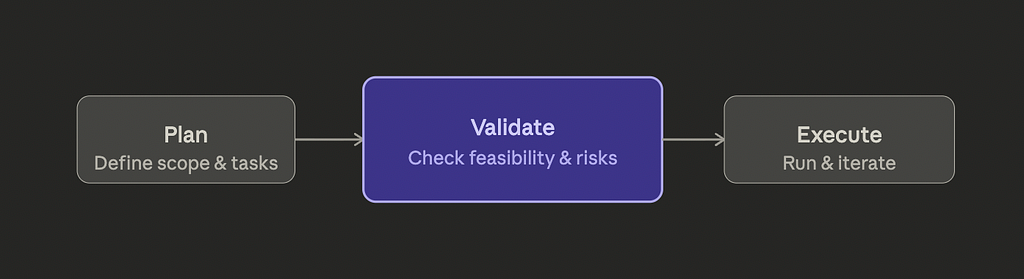
The Plan-Execute Trap Thanks to Claude Code Leak, which showed how the internal Claude Code team works, I am now catching bugs that code review missesEverything started with a huge feature request last week.I generated a detailed plan for restructuring a Flutter project. It ended up having five tasks, 30+ implementation steps, 4 big Architecture Decision Records. The plan covered everything: error handling patterns, folder structure, dependency injection, testing strategy. It looked perfect to me.Before, I would’ve sent this straight to execution. An agent picks up the plan, starts writing code, and I review the output later. That was my AI workflow for months. Plan, execute, review.A couple of weeks ago, Claude Code accidentally pushed their source code to public (see Claude Code Source Leak Megathread on Reddit). After checking what they have myself and reading the community analysis over it, I decided to adopt some practices from them. And, I implemented a validation step between the plan and execution. Ten minutes. Zero code written.The result: seven issues surfaced, including unverified package versions that could’ve broken the build, a task that touched 20+ files per step without checkpoint guidance, and acceptance criteria that were too vague for an agent to verify against.Neither my agents nor my half-baked (especially when they are my own stupid indie projects) code review would have caught these before (at least some of them, I'm still reviewing them OK?!)Most AI-assisted development workflows have two phases. You describe what you want (the plan), then an agent builds it (the execution). Maybe you add code review at the end. This is the setup you’ll find in most tutorials, most tools, most workflows.It looks efficient. You’re not wasting time on ceremony. You plan, you execute, you review. Three clean steps.The problem is the gap between planning and execution. Plans contain assumptions. Some are explicit, like “use fpdart for error handling.” Some are implicit, like assuming a package version exists, or assuming a directory structure is already in place, or writing “verify the feature works” as an acceptance criterion without defining what “works” means.Agents don’t question these assumptions. They execute. If your plan says “implement authentication,” the agent will make a reasonable guess about what that means. Its guess might be wrong. You won’t find out until code review, after the agent has built an entire feature on top of that guess.I kept running into this. Not on small tasks. On the bigger ones, the ones where planning felt thorough and comprehensive. The more detailed the plan, the more hiding spots for unresolved decisions.Here’s what I was finding in code review that shouldn’t have made it that far:Unverified dependencies. A plan says “add fpdart ^1.1.0.” Does that version exist? Does it support the Dart SDK version in the project? The plan doesn’t check. The agent doesn’t check. It adds the line to pubspec.yaml and moves on. If it breaks, you find out during execution, not planning.High-risk steps without guardrails. A task that touches 20+ files in a single step is risky. If something breaks halfway through, you need to know where to roll back to. But the plan just lists the files and moves on. No checkpoints, no intermediate verification.Vague acceptance criteria. “Verify the DI setup works” isn’t something an agent can verify. What does “works” mean? All dependencies resolve? The app compiles? A specific test passes? The vaguer the criterion, the more the agent has to guess. And guessing is where bugs come from.Orphaned references. A plan mentions a file in its “Files Touched” section that no step actually creates or modifies. Or a step references a directory that doesn’t exist yet without a creation step. These are small things. They cascade.Stale assumptions. The plan was written against a specific branch state. By the time execution starts, has anything changed? Are there uncommitted changes that might conflict? The plan doesn’t know.Every one of these is fixable. But they’re only fixable if you catch them before execution starts. Once code is being written, these assumptions become load-bearing walls. Changing them means rework.The fix was adding a single step between planning and execution. I call it validate-plan. It reads the plan file and runs five checks:Plan syntax. Does the plan follow the expected structure? Are there acceptance criteria for each task? Are dependencies between tasks declared? This is mechanical, like a linter for plans.Scope boundaries. Does the plan stay within what was originally requested? Plans tend to grow. A task that started as “migrate error handling” quietly expands to include refactoring three unrelated modules. Scope creep in a plan becomes scope creep in execution, except now an agent is doing the creeping and you won’t notice until review.Decision register integrity. Every architectural decision in the plan should map to a documented rationale. If the plan says “use feature-first folder structure,” is there a record of why? If not, the agent has no way to make judgment calls when edge cases come up during execution.Execution step viability. Can each step be completed as described? Are the referenced files and directories real? Are the tools and commands available? Are the steps ordered correctly based on their dependencies?File and folder readiness. Does the current state of the repository match what the plan expects? Are there uncommitted changes that could conflict? Missing directories that need to be created first?The output is a report: blockers (must fix before execution) and warnings (should address, won’t break things). In the Flutter project case: zero blockers, seven warnings. Ten minutes to generate. All seven warnings were things I fixed in the plan before a single line of code was written.Code review is good at catching implementation bugs. Wrong logic, missing edge cases, bad patterns. It’s not good at catching planning bugs. Funnily, there is no code before the execution at all. And, you are handing over the plan to an agent and believing that the code will be sound! Not happening.By the time you’re reviewing code, the architectural decisions are already made. The folder structure exists. The dependency versions are locked. The acceptance criteria were already interpreted by the agent, one way or another.If the plan said “use injectable for DI” but didn’t specify whether to use lazy or eager initialization, the agent picked one. Code review will show you which one it picked. But at that point, you’re evaluating “is this acceptable?” instead of “what should this be?” Those are different questions. The second one should have been answered before any code was written.Code review also can’t catch what wasn’t done. If a plan was missing a step, the agent didn’t skip it. It was never there. There’s nothing in the code to review because the work was never performed. You’d have to notice the absence of something, and that’s much harder than noticing the presence of a bug.Validation catches absences. “This plan doesn’t verify the output after a high-risk step.” “This acceptance criterion is not agent-verifiable.” “This dependency version hasn’t been confirmed.” These are things that are visible in a plan and invisible in code.Before adding the validation gate, I’d estimate about 30–40% of the issues I caught in code review were things that shouldn’t have made it past planning. Not code bugs. Planning bugs. Assumptions that should have been resolved, decisions that should have been made, criteria that should have been sharpened.After adding it, that category dropped significantly. The issues I find in code review now are real implementation issues, things that couldn’t have been caught without seeing the actual code. That’s what code review is supposed to be for.The bigger shift is how I think about plans. Writing a plan used to feel like the last creative step before handing off to automation. Now it feels like a draft. The validation step is the editorial pass. It makes the plan tighter, more explicit, more executable. And it takes ten minutes.It’s cheaper to fix a plan than to fix code. That sounds obvious when you say it out loud. But most AI workflows skip the step that makes it actually true.If you’re using AI agents for anything beyond small one-shot tasks, your workflow probably has a gap between planning and execution. A gap where assumptions live unchallenged, where decisions are implied but not recorded, where “works” means different things to you and the agent.Adding a validation step there doesn’t require new tools or frameworks. It requires the discipline to ask: is this plan actually ready to execute? Not “does it look good,” but “can an agent execute this without making any decisions on my behalf?”If the answer is no, the plan isn’t done yet. And that’s a much better time to find out than during code review.I’ve been building this validation step as a custom Claude Code skill that plugs into my planning-to-execution pipeline. If you’re interested in how the full workflow fits together, I wrote about the broader approach in By the time execution starts, there should be nothing left to decide.If you have come this far, I guess I can assume that you are interested in AI and tech. If you want more reads in tech and lifestyle around tech don’t forget to check out my profile. If you wanna choose your next read immediately, you can go for this one: I Forgot What I Worked On YesterdayAlways review what AI generates before pushing. It handles the tedious stuff, you stay the engineer.Wish you all the best in your AI journey!I Added One Step to My AI Workflow, and It Boomed the Quality was originally published in Level Up Coding on Medium, where people are continuing the conversation by highlighting and responding to this story.
201 Claude Code Agent Personas. I Installed Zero
What Agents Actually Do Then I finally understood what an agent actually isThere’s a repository out there, agency-agents, with 200+ Claude Code agent personas well clustered under their expertise, such as Marketing, Sales, Development, everything a tech business might need. Each one is a detailed character with personality traits, domain frameworks, code examples, and communication style guidelines. Some are genuinely impressive, to be honest.I spent a few hours going through the repository and the agent details. Going through them helped me understand something that’s easy to miss when you’re new to agentic development: agents and skills solve completely different problems.An agent in Claude Code is essentially a persona. It tells Claude who to BE for the duration of your session. A Security Engineer agent comes loaded with threat modeling methodologies, OWASP frameworks, secure coding opinions, and a specific communication style — “I approach every system with an adversarial mindset.”That sounds powerful. And it can be, for the right situation.Agents are great for ad-hoc advice. You’re staring at a weird architecture decision and you want a Software Architect’s perspective. You load the persona, have the conversation, and close it out.But that’s it. The next session? You load it again. Start over. No memory of the project. No continuity. No phases. No workflow.A skill is different. It tells Claude what to DO, and in which way you want Claude to do that. Not who to be.Specifically:- What phases to run through- What files to read and write- What model to use for which step- What tools are allowed or restricted- What the output looks like at the endYou run a skill, it produces something concrete, and next session you can pick up exactly where you left off. The skill doesn’t care about personality. It cares about process.That’s a fundamentally different thing.Here’s where I started developing a skepticism about full agent installs.Those 201 personas are 300-500 lines each. Personality guidelines. Communication style. How the agent responds to pushback. Preferred frameworks. Examples of good vs. bad output.Every time you invoke an agent, all of that loads. Every single call. Most of it is noise for your specific situation.The Security Engineer agent has hardcoded opinions about how to structure a threat model. But your system doesn’t look like the system the agent was designed for. Your stack, your risk surface, your team’s tolerance for ceremony, all different.You end up fighting the agent as often as using it.The extraction from an agent to a skill isn’t refactoring. It’s a contract boundary. The skill describes what to do, and the orchestrator decides when and with what data.But here’s what I noticed after a few hours of reading through these personas. Every good agent has a gem inside it. One specific framework. One methodology that would genuinely improve a workflow if applied correctly.The Security Engineer? STRIDE threat modeling. A structured way to think about adversarial scenarios: Spoofing, Tampering, Repudiation, Information disclosure, Denial of service, Elevation of privilege. That’s a real, battle-tested framework. Worth having.The problem isn’t the content. It’s the packaging. 400 lines of persona wrapper around 20 lines of actual value.I didn’t install any agents for my development workflows. I extracted the frameworks instead. Two small additions to skills I already had running:My security review skill now starts with an adversarial threat assessment phase. I took the STRIDE model out of the Security Engineer agent and embedded the questions directly into the review workflow. No persona needed.My planning skill now generates an ADR automatically when a change involves an architectural decision. Borrowed the template from the Software Architect agent. Works exactly the same.Zero persona bloat, great addition to the skills I already tailored.The security review runs the same way every time, on every project, without loading 400 lines of Security Engineer personality. The ADR template shows up exactly when it should, without me having to remember to ask for it.That’s the difference between a workflow and a persona. One is reliable. The other depends on you remembering to use it.Before you install any agent, from this repo, from anywhere, ask one question: What is the one thing this agent knows that my current setup does not?Not what the agent does in general, or not what persona it assumes. The one specific piece of knowledge that would make your existing workflow better.Find that piece. Extract it. Embed it where it belongs in your workflow, and leave the rest behind.Most of the time, the answer is a framework, a template, or a checklist. Something you can write in 15 to 20 lines and slot directly into the right skill phase. No personality guidelines needed. No hardcoded communication style.The agent was a container for the knowledge. You don’t need the container.This distinction, agent vs. skill, persona vs. process, matters more as you build out your AI-assisted development setup.If everything you use is persona-based, your workflow depends on you knowing which persona to invoke at which moment. You become the orchestrator, manually selecting the right character for each situation. That’s cognitive load you’ve added to yourself.If your setup is skill-based, the workflow knows when to apply what. The adversarial threat assessment happens because the security review skill runs it. The ADR gets generated because the planning skill detects an architectural decision. You’re not managing personas. You’re running repeatable processes. That’s the shift worth making.I’ve been building out this kind of skill-based setup for a while now. If you want more reads in tech and lifestyle around tech, don’t forget to check out my profile. If you wanna choose your next read immediately, you can go for this one: I Forgot What I Worked On YesterdayWish you all the best in your AI journey!201 Claude Code Agent Personas. I Installed Zero was originally published in Level Up Coding on Medium, where people are continuing the conversation by highlighting and responding to this story.

I Forgot What I Worked On Yesterday
The Day That Made Me Build Something Coding with agents is great, but it comes with a costSince I started to work with agents, I have stopped knowing what I did each day. Not because I did not own the AI work. I understood everything that it has done as a responsible senior developer, for sure! Yet, the context switch and mental load were messing with me.I mean literally, I’d sit down the next morning, open my laptop, and draw a blank on what I shipped, what I fixed, what I decided the day before. The tools were doing a lot. I was doing a lot. But none of it was sticking.This started to be a problem at work as I started to report the necessary details during the dailies, as well as losing track of details I should've given attention to.It was clear at some point: I was developing brain fog that is way more dense, by using Claude Code than doom scrolling.A few weeks ago, I ran 22 Claude Code sessions across 6projects. 886 messages. In a single day.The energy I spent and the output were the kind of things that used to take a week or so. Bugs fixed, features shipped, experiments run, a whole pipeline redesigned, all before dinner. And I felt great about it while it was happening.That night, when I tried to actually reflect on what I’d done, I couldn’t reconstruct it. I remembered the shape of the day, something about calendar bugs, something about a pricing test, but the specifics were gone. The wins, the gotchas, the decisions I’d made and why, all blurred together.I wrote a note to myself: “The cognitive cost of agentic parallelism. High throughput, but declining awareness.” (The actual note was more like "I often realize that idk what I did these days")That note became my tiny open source project dear-diaryClaude Code stores your conversation transcripts as raw JSONL files in ~/.claude/projects/. They’re noisy, full of tool calls, thinking blocks, internal metadata. There’s no way to look at them and understand what actually happened.dear-diary cleans that up in two stages.Stage 1 is a pure Python script called extract.py. Zero external dependencies — no pip, no virtual environment, just the standard library. It scans your Claude session files for a given date, strips the noise, groups everything by project, and writes a clean JSON file. No LLM is involved at this stage. Same input, same output, every time.Stage 2 is a Claude Code skill called /diary-review. You run it from the project directory, and it reads the diary JSON from Stage 1 and produces a structured reflection: Day Overview, What I Worked On, Wins, Learnings, Challenges, Patterns, Key Takeaways, and Seeds for Content (blog angles, basically).The skill has two modes. Auto mode runs parallel subagents against each project and synthesizes everything without you. Reflection mode — the default — is different. It talks to you first.I thought I was building a logging tool. I was wrong.The first time I ran /diary-review in reflection mode, it gave me a quick summary of the day — project names, what was done — and then asked me a specific question. Not “how did the day go?” but something like: “You ran three production bug fixes today, all triggered by funnel analytics, not crash logs. What made you look at the funnel instead of Crashlytics?”That question surfaced something I had completely lost. I sat down and typed the answer. Then it asked a follow-up.By the end of that 10-minute conversation, I had a reflection that captured not just what I did, but why I made the choices I made, what I was worried about, and what I was actually proud of.That’s different from logging. The manual Q&A process forces awareness, it makes you realize what you actually accomplished, not just what you touched. The reflection question bank is organized by the shape of your day: bug-heavy days get different questions than multi-project days or feature-shipped days. It’s contextual, not generic.One word I wrote in my diary for that day: “euphorically exhausting.” Touching 6 projects in a day with agents is both the blessing and the curse.dear-diary itself was built in a single day, using the same workflow it’s designed to reflect on.A bunch of commits, step by step: CLI skeleton, output writer, session discovery, date filtering, message extraction, full pipeline, tests. Then the skill, then iteration on friction (inline Python in Claude skills triggers security heuristics — had to extract helper scripts to fix that), then a README, then an open-source release.The next morning, I ran the diary review on the day I built it. That first reflection made clear the tool wasn’t about logging. It was about building awareness of your own work. About feeling proud of what you shipped instead of wondering what day it even was.I’ve thought about what actually changed. It’s not speed. dear-diary doesn’t make me write code faster.It’s awareness. And awareness compounds. When you know what you shipped yesterday, you make better decisions about today. When you can articulate a win clearly, it stops blurring into the noise.The repo is at github.com/arutkayb/dear-diary. If you use Claude Code and have been feeling the same blur at the end of the day, give it a try. And do not hesitate to open a PR to extend it to agentic tools other than Claude Code.If you have come this far, I guess I can assume that you are interested in AI and tech. If you want more reads in tech and lifestyle around tech don’t forget to check out my profile. If you wanna choose your next read immediately, you can go for this one By the time execution starts, there should be nothing left to decideAlways review what AI generates before pushing. It handles the tedious stuff, you stay the engineer.Wish you all the best in your AI journey!I Forgot What I Worked On Yesterday was originally published in Level Up Coding on Medium, where people are continuing the conversation by highlighting and responding to this story.

By the time execution starts, there should be nothing left to decide
The agent isn’t broken. The input was. There’s a version of AI-assisted development that looks productive but isn’t. You describe something, the agent writes code, you review it, realize it missed the point, describe it again — slightly differently — and the cycle repeats. The agent isn’t broken. The input was.I kept running into this loop. Not because the tools were bad, but because I was treating AI agents like they had judgment they don’t have. Eventually, I stopped trying to make agents smarter and started making my inputs better. What came out of that was a structured workflow I’ve been refining for weeks — and it changed not just how I build, but how I think about development.The Real Problem With “Just Ask AI”When you delegate a task to another person, they ask clarifying questions. They flag ambiguity. They tell you when your requirements don’t make sense. Agents don’t do that — or at least, they do it at the wrong time: mid-execution, when undoing mistakes costs more than the original task.The root cause is almost always the same: the requirements going into execution contain open questions. Not always obvious ones. Sometimes it’s something as subtle as “what counts as done?” Sometimes it’s a decision that seemed clear in your head but never made it into writing.I started thinking about this differently after a project where I handed an agent a solid-sounding task and got back something technically correct but architecturally wrong. The agent had made a reasonable guess where I should have made a decision.That’s when I landed on the principle I now design everything around:By the time execution starts, there should be nothing left to decide.The shift this required was counterintuitive. Instead of spending less time upfront (the whole appeal of AI), I started spending more — deliberately, in structured stages, before any code got written.The idea is simple: every stage of development resolves the open questions produced by the previous stage. Ideation produces questions about what you’re actually building. Specification resolves those and produces questions about technical approach. Planning resolves those and produces a step-by-step execution path with no remaining ambiguity.By the time an agent runs, it’s not reasoning under uncertainty. It’s executing a plan someone already thought through. That someone is me.This sounds like more work. It is — up front. But the execution phase becomes dramatically faster and more accurate. More importantly, when something does go wrong, it’s easy to trace back to which stage the assumption broke down. That’s something you can fix. A tangle of agent-generated code built on a vague brief is much harder to untangle.Here’s the part that took me longest to get right: the artifacts produced by this workflow serve two very different audiences simultaneously.Agents need precision. They need machine-verifiable acceptance criteria, not “the feature should work well.” They need explicit decisions, not implied ones. They need each step scoped tightly enough that success or failure is unambiguous. A plan that says “implement authentication” is useless to an agent. A plan that says “implement JWT-based auth with 1-hour expiry, refresh tokens stored in HttpOnly cookies, endpoint returns 401 with error code on invalid token” — that’s something an agent can execute against.Humans need narrative. I need to be able to open a plan file and understand what I was thinking when I wrote it. I need to see why certain decisions were made, what alternatives were considered, what risks were flagged. I need to be able to edit a plan before running it, and have that edit mean something.Most frameworks optimize for one of these. I wanted both.The answer was keeping everything in plain Markdown. Plans are readable documents, not database records. Every plan file has a clear structure: what’s being built, what each step does, what “done” looks like. A human can review and edit it before execution. An agent can read it and execute it step by step, checking off each item as it goes.The same file serves both purposes. That constraint — that every artifact has to be legible to a human and executable by an agent — shaped every design decision in the workflow.One of the underrated problems with AI-assisted development is context fragility. You have a great session, make good progress, close the terminal, and the next day you’re back to square one explaining what you were doing.I solved this by treating execution state as a first-class artifact. Every task gets its own folder. Plans track their own progress with checkboxes. There’s a separate state file that records which steps completed, what was committed, what’s left. Execution always happens on a dedicated branch.The result: resuming a task isn’t a memory exercise. You run the same command, the workflow reads the state file, and picks up exactly where it left off. The conversation context is gone. The execution context isn’t.This also means the plan file becomes a historical record. After a task is done, I can look at the plan and see every step, in order, with the logic behind each one. That’s more useful than git blame.There’s a second layer I added that I didn’t anticipate needing: a project-level log that tracks everything that happened, in reverse chronological order.Not code changes — git handles that. But decisions. Pivots. The time I abandoned an approach halfway through because I realized a dependency was wrong. The time I changed the data model three days in. These are the things that never make it into commit messages but are exactly what future-me (or future agents) need to understand why the codebase looks the way it does.Every workflow stage appends to this log automatically. Decisions I make manually get logged with a dedicated command. The result is a single file — a timeline — that gives a complete narrative of the project. One file. Start here when resuming after a break. Read the decisions folder when something seems weird about a past choice.The pattern I keep coming back to is: clarity compounds. Each bit of context you capture makes the next decision easier. Each decision you log makes the next agent run smarter. The overhead of maintaining this log is trivial. The payoff, over a project lifecycle, is significant.What ChangedBefore this, I’d estimate about 60–70% of my back-and-forth with agents was resolving ambiguity that should have been resolved before I started. Requirements that seemed clear to me but weren’t precise enough to execute. Decisions I thought were made but hadn’t been written down.Now that percentage is much lower. Not zero — I still discover things during execution that change the plan. But they’re real discoveries, not just the cost of vague inputs.The bigger shift is harder to quantify. I think more clearly about what I’m building before I start building it. The workflow forces a kind of structured deliberation — not paralysis, but rigor. Writing acceptance criteria that an agent can verify against turns out to be good practice whether an agent ever reads them or not. You learn a lot about what you actually want when you have to make it falsifiable.The TakeawayIf you’re using AI agents and finding yourself in loops — re-explaining, course-correcting, undoing — the problem is probably not the agent. It’s that the inputs contain decisions that weren’t made yet.The fix isn’t better prompting. It’s a workflow that forces you to make all the decisions before execution begins. One that produces artifacts a human can read and edit, and an agent can execute without guessing.Front-load the thinking. Make everything readable. Trust the execution.I’ve been building this framework as a set of custom Claude Code skills and have been running it on real projects for several weeks. If you want to know more about how I’ve structured the workflow or the tooling behind it, drop a comment — happy to go deeper on any part of it.A few people have asked about the actual skill files behind this workflow. If you’d find it useful to have the raw files — the ones that power each stage of this pipeline — drop a comment below. If there’s enough interest, I’ll update this article with direct links so you can plug them straight into your own setup.If you have come this far, I guess I can assume that you are interested in AI and tech. If you want more reads in tech and lifestyle around tech don’t forget to check out my profile. If you wanna choose your next read immediately, you can go for this one Frustrated with Boring Review Comments? Resolve them at once with Claude Code Custom Skills and CommandsAlways review what AI generates before pushing. It handles the tedious stuff, you stay the engineer.Wish you all the best in your AI journey!
Frustrated with Boring Review Comments?
Adding a Custom skill Frustrated with Boring Review Comments? Resolve them at once with Claude Code Custom Skills and CommandsGitlab version is also explained with the necessary skill files attachedHow familiar are you with these review comments?“Can you add comments to this code?”“Please rename this variable to something more descriptive.”“Can you break this function into smaller functions?”“Please remove this commented-out code.”“Can you add type annotations?”“This should be an enum, not a string.”“Can you move this to a separate file?”“This logic is duplicated — can you extract it?”“Please don’t use any here."“Can you use a more descriptive commit message?”“Can you use destructuring here?”“This import is unused.”“Please handle the edge case where this is empty.”“Can you add logging here?”“This could be a one-liner.”“Can you sort these imports?”“This belongs in the utils folder.”AI coding tools and agents are drastically shaping the way we code these days. As a 10+ years experienced developer, I acquired a lot of knowledge and skills on my way to becoming today's me. Long architecture discussions, whiteboard brainstorming sessions, arguments end up being almost fights. Throughout the journey, I've seen many developer, regardless of their seniority and experience, getting frustrated by code review comments like above.Don't get me wrong, they are really valid comments, and we all should follow certain practices that don't matter if it is as big as a wrong architectural choice or as small as word case formatting. But I am sure that after days, sometimes weeks, of development, seeing these small, easy-to-fix review comments can get your nerves.Thanks to recent tools, today's developer can focus on the business impact and engineering concerns to operate the AI and review what's been done, instead of spending precious hours on straightforward, no-brainer review requests.I was in Italy last month to visit a close friend for his birthday. He is working at one of the big tech companies in the data collection field. He told me that the engineers at his company received an ultimatum from their higher management: if they don't use AI sufficiently across all company tasks, they risk being fired. It was this clear. Though it is funny that they were counting the tokens their engineers use in a month to assess if they are using "AI" well enough :DHowever, I heard that they've been exploring Claude and its capabilities deeply. I started to check it and realized that Claude is becoming a kind of tech World standard. And there are tons of fantastic ways to leverage it to pump up your productivity. Copilot seemed an ancient tool besides Claude.I am relatively new to Claude code, as I've been using Copilot since its first day. And this X thread from Boris Cherny, the creator and head of Claude Code at Anthropic, gave me a great starting point to shape my CLAUDE.md files, Caude skills, and so on.Let's get back to resolving review comments with Claude. If you haven't installed the command-line tool yet, you can do it by following the instructions in this link.Once you start your Claude session with claude command, you will be able to use all kinds of skills/claude-commands. The one we are interested in here is pr-comments . As you can see in the description of the command, it gets all the comments from a GitHub pull request. Then, the only thing left is for you to tell Claude to resolve the issues listed in the command result, that's it!But there is a problem if you are not using GitHub as a source control. I use GitLab and there is no mr-comments command to fetch the comments from GitLab by defult.No worries! Claude Code gives you a way to create your own skills, which means custom commands.Steps:Create .claude/skills/<command> . In our case glab-mr-commentsCreate SKILL.md file under the newly created skill folder.Create your skill file, or feel free to use mine directly https://gist.github.com/arutkayb/d842121ed0e76b61f835ff3983b4622eAs my skill file uses the REST API of Gitlab to access the merge request, you need to define GITLAB_API_TOKEN environment variable and set your private Gitlab api token in your ~/.zprofile or any other env file export GITLAB_API_TOKEN=...And now you can start a Claude session on your terminal and start using your new Gitlab MR comment command!And an example response of the new command to follow up with "Resolve them":If you have come this far, I guess I can assume that you are interested in AI and tech. If you want more reads in tech and lifestyle around tech don't forget to check out my profile. If you wanna choose your next read immediately, you can go for this one By the time execution starts, there should be nothing left to decideAlways review what AI generates before pushing. It handles the tedious stuff, you stay the engineer.Wish you all the best in your AI journey!

"Set the bar high once, and that becomes the standard."
The untold truth in your career journeyThroughout my childhood, I heard this phrase from my dad, like a billion times. Back then, I was just smiling at it, not taking it seriously. It was rather making me feel a bit uneasy to be honest. There was something inherently wrong about this advice. Each time I heard it, I felt somewhat wrong in moral terms. There was some sarcasm, some disappointment, some giving up in it.I never took the advice.I spent my high school years reading about Tesla, Kodak, Steve Jobs, Ford and all the big names. I was super excited about having my own patent at some point. I was even more excited about inventing a kitchen tool that everybody in the World would want to get one. I revisit those memories now and I realize some patterns in my excitement. I wanted to be recognized. I wanted to be known. But I wanted to be "useful" while doing that. I wanted to build, write, produce, use my hands, use my brain, use everything I have. I didn't know the limits of exhaustion. I didn't know the thing called burnout. I pushed myself hard. I enjoyed doing so.It's been 10 years in my developer journey. I've been coding small robots, Raspberry Pi, office phones, Android apps, POS devices, voicemail systems, and the list goes on. I am naturally competitive. But not competing with others, mainly, I don't enjoy that kind of stress. Setting some bars for myself and racing against them has always been my way.This habit naturally helped me in my "maker" life and career in some ways. It helped me to be recognized as a strong, reliable developer. It helped me meet great people and set new bars for myself, and it eventually helped me build amazing products. I pushed the bar up and up every day. "A day that is no better than the previous one is a wasted one" was my motto. I took this saying as it is talking about my maker skills. Whenever I didn't learn a new skill for a day, I would feel disappointed in myself as I wasted a day, which would never come back. I didn't realize that the bar I set was becoming a new normal instead of something to be grateful for, something to recognize myself.At some point, soon after I graduated from the university, and soon after I started to work full-time for companies, something weird started to happen. I got my first warning from my body and mind. I lost the meaning, like, of everything.Life felt heavy. I was looking for a guilty, a culprit at least. I started with the closest things around me. My family, my partner, my job, the city I live in, the country I live in. I needed a change, I thought. Yes, a change would do it.Then, I changed things. I changed my job. I had fights with my partner. I moved to another city. I changed my job again. After every change, I felt slightly better. A refreshment followed each of them. I thought, yes, I'd finally figured it out. I need change whenever I feel heavy, whenever I lose the meaning.I followed this pattern for some years. I didn't realize that I made life really hard for people who loved me. I was trying to help myself and I always thought of changes as new bars to set. I was jumping instead of stalling. I was flowing instead of standing. I needed more changes. Eventually, I changed my country as well. A fresh start, a big jump, new opportunities, new people, new language, new culture. I rock!No, it was a lie. It didn't last long before life got heavier than ever.Last year, my new employer rejected my request for a salary raise. It happened for the first time in my career. It was the turning point for me.I was jumping into every novel topic. Writing a shit ton of well-engineered, good, senior-level code as I was expected to do. From the first day I joined the company, I raised the bar every day. I coded faster than the day before. I communicated with the stakeholders more and better every day. At some point, I raised the bar so high that I was not able to raise it that fast anymore. I was at my limits. And I got a performance review from my boss. It was full of "works as expected" instead of "exceeding expectations", which I always chased. It hit hard, it felt personal, I got punched in the face by that. Fu*kkkkkkKKKKKKKKK. I got a small meltdown.I calmed down, reflected on what's been happening for the last 10 years, started therapy. I realized some prominent patterns. Recognition, incompatible set of values, personal desires and Capitalism, selling my precious time for the last 10 years, not enough roots in the World due to all the "change" I chased. I realized that I set some bars high, and they became the new normal. Not for my body and mind, though.I decided to grow rather than raise some bars.Thank you for reading a piece of my life and struggles. Nowadays, I encounter more content that resonates with me. Many people struggle with incompatible values due to capitalist requirements and humane desires. Loosened human connection, tech-occupied lifestyle, and losing meaning are happening all around.I am at a deeper stage of learning about myself, finding ways to cope with life, and recognizing my inner values even more. I wish you would find your own unique ways to find your place in this vastness.

Professional Validator of a Robot’s Opinions
AI silently changes us, and we are all becoming mediocre as f*Me: "Claude, tell me the ball-throwing methods that would help me hit the bull's eye constantly."Claude: "The physics is simple — it’s muscle memory that makes it consistent. Deliberate practice with feedback (noting where misses go and why) matters more than any single technique adjustment. Common error: Rushing. Slow, identical motions beat fast variable ones."The internet is full of long dash symbols (—) these days. It is somewhat uneasy to see, inhumane, and slightly disgusting. Yet, it is everywhere. The internet is dying, and these long dashes are the visible symptoms of the cancer it is going through.When I open LinkedIn, I despise being in this "professionalism" game. You can immediately see the sh*t self-promotion posts on steroids. According to statistics as of October 2024, 54% of long-form posts are estimated to be AI-generated. The people you get professional inspiration from, the people you admire, the people who are in 1% of money makers who have the potential to make big changes in their surroundings, are using ChatGPT to write you a few sentences that tell you how to become better.It is not any better on Reddit, here on Medium, or X. You can find out that more than half of the content is created by bots on these platforms as well. If you are an authentic person who follows your heart instead of the guidance of the algorithm that tells you what you should do to stand out, you won't stand out. Because those algorithms are trained by the bot-generated content, those algorithms are promoting hatred, those algorithms are guided to pick the most f*ed up way that hooks our caveman brains with the help of the best engineers and professionals in the world who probably post AI content on LinkedIn.It is not fully on "them" anyway. Unfortunately, we use AI to generate emails, summarize books and articles, translate a video into written content to summarize it into something even easier to consume. We go through things quickly instead of digesting anything. We have a quick glance at the email ChatGPT generated a minute ago and approve that it did a decent job before we push the send button.Big congrats to us, we can now enjoy our new title in life: Professional Validator of a Robot’s Opinions.As a millennial, coming from a non-social-media World and transitioning to this one, I miss authentic things around. I love all these tech toys, and I appreciate them a lot as an engineer myself. Yet, I miss authentic content that doesn't have any behind-the-scenes goal, such as playing to the algorithm or promoting an affiliate product, or just mass consuming everything and bragging about all the things they consume. Don't get me wrong, people should be able to earn money as they put effort into their content, indeed. I don't know… I might have lost my ground in having realistic desires in this era.

Half a Cup, Cold Coffee
A mediocre morning for a programmerI gulp my coffee. No milk, no sugar, hand-grinded. Something is off with its taste. I try not to think. I check emails from last week. I take a sip. I start to prepare my daily stand-up message. We are having our daily meeting written, async. I take another sip. Ugh, horrible. 30 minutes have passed without realizing. The coffee tastes off. And now, also cold.I open 3 browser tabs by habit. LinkedIn, Medium, Reddit. I scroll. There are a bunch of founder posts. All shit posts. A frustration wave inclines. I close the tab immediately. I move on. The next tab shifts to the left.The first three posts are marked as NSFW. Blurry images. I scroll. Some people try to promote brand-new products. Another AI tool. Another social media platform. My face feels warmer. I grind my teeth. The next tab shifts to the left.“My first 1000 subscribers on YouTube: 5 Easy Steps”. I slide two fingers on the trackpad. I recall that I used to write here, and subtly mourn. I keep scrolling. All bullshit, I do think, while doing so. I decide to visit my old articles. I feel the nostalgia. My eyebrows go up, eyelids down, deep breath. A title catches my eye. Written 5 years ago. “I didn’t Notice Burnout“. No, actually, I noticed. I feel the same way, for the following 5 years, also today. Everything I write there keeps resonating. Everything shakes from the resonance. However. I think about projects I finished. The ones I decided to do as side hustles or just for fun. Best times ever! I mumble. You are getting old, I whisper. Stop pitying yourself and realize that it is fear, I speak professionally. The fear of realizing that life is as hard as ever. It is not harder, not easier. It is just as hard as usual. It is always hard. It is also always easy. It doesn’t change much, in reality. We are the ones who change. I guess.I get bored with this overthinking session. I wanna buy a motorbike, I mumble. I check some second-hand motorbikes. I call one of the sellers and make an appointment. I appreciate this moment for a while. I stand up. I need a coffee.

The ChatGPT Experiment: Making Fluent English Less Native-Like
Using ChatGPT to Sound More Natural as a Non-Native English SpeakerAs non-native English speakers, we often strive to make our writing sound more natural and fluent. While grammar and vocabulary are essential, there’s an additional layer of nuance in native-like writing that is hard to master. AI tools like ChatGPT can help bridge this gap, but an interesting question arises: Can we also use AI to make writing sound deliberately less native?To explore this, I conducted an experiment where I took a well-written article about generative AI and rewrote it to mimic how a proficient but non-native speaker might phrase things. This process revealed key insights into how AI can be used for both refining and simplifying language to match different communication styles.The Experiment: Making Fluent English Less Native-LikeFor the experiment, I started with a well-structured article on generative AI, written in a fluent, native-like manner. Then, I used ChatGPT to revise the article, intentionally making it sound like it was written by someone for whom English is a second language.Key Changes in the RevisionSimpler Sentence Structures:• Before: “Generative AI refers to artificial intelligence models capable of creating new content, such as text, images, music, and even code.”• After: “Generative AI is a kind of artificial intelligence that can make new things like text, images, music, and code.”• Why? Non-native speakers often use shorter, more straightforward sentences instead of complex noun phrases.Less Advanced Vocabulary:• Before: “Deep learning techniques, especially transformer architectures, power most modern generative AI systems.”• After: “Most modern generative AI uses deep learning, especially transformer models.”• Why? Phrases like “power most modern systems” are more natural for native speakers, whereas “uses deep learning” is more direct and easier to grasp.More Repetitive Sentence Patterns:• Before: “Generative AI is transforming industries, from automating content creation to enhancing design and creativity.”• After: “Many industries use generative AI for automation, creativity, and design.”• Why? Non-native speakers might repeat structures instead of varying sentence flow for stylistic effect.More Explicit and Direct Statements:• Before: “As research progresses, generative AI is expected to become more controllable, customizable, and aligned with human values.”• After: “In the future, generative AI will improve and follow human needs more closely.”• Why? Abstract phrases like “aligned with human values” may be challenging, while “follow human needs” is clearer.What This Experiment Reveals About AI and Language LearningAI Can Help Adapt Language to Different Levels of FluencyWhile most people use ChatGPT to make their writing more polished, this experiment showed that it can also be used to simplify language. This could be useful for learners who want to write in clear and understandable English without necessarily sounding overly sophisticated.Fluency Isn’t Just About Grammar – It’s About NuanceA grammatically perfect sentence doesn’t always feel natural. Native speakers tend to use varied sentence structures, idiomatic expressions, and implicit meanings, while non-native speakers lean towards directness and clarity. ChatGPT can help bridge this gap by providing multiple versions of a sentence to match different styles.AI Can Be a Training Tool for Different Writing GoalsDepending on the context, different levels of fluency might be desirable. For formal business emails, a native-like tone might be preferred, while for technical writing or beginner-friendly content, a clearer, non-native style might be better. AI allows users to experiment with both and find the right balance.Practical Uses of AI for Non-Native SpeakersBased on this experiment, here are some practical ways to use ChatGPT effectively as a non-native speaker:• To improve fluency: Ask ChatGPT to rephrase your writing in a more native-like way.• To simplify complex writing: Use ChatGPT to break down difficult sentences into simpler forms. You can try leveraging “act as a” trick or ask something like “Rewrite it as if English is your second language, and you are quite proficient but not a native speaker.”• To compare different styles: Generate multiple versions of a sentence – one formal, one casual, one simple – to see what fits best.• To learn nuances in English writing: Analyze AI-generated responses to understand how small changes in phrasing affect tone and readability.ConclusionChatGPT isn’t just a tool for perfecting English – it can also be used to adjust fluency and style based on specific needs. Whether you’re a non-native speaker trying to sound more natural or a content creator looking for clear and direct language, AI can help shape writing in ways that suit different audiences.This experiment highlights how AI can be a valuable partner in language learning, allowing users to refine, simplify, or experiment with their writing. Instead of relying solely on grammar rules, non-native speakers can now leverage AI to explore different styles and become more confident in their communication.The ChatGPT Experiment: Making Fluent English Less Native-Like was originally published in Seek For Wealth on Medium, where people are continuing the conversation by highlighting and responding to this story.